A work order can be placed on hold for several reasons and can go in almost any direction once the next update is provided. Latchel provides the following options once you’re ready to get the work order moving again.
Content
- Objective
- Content
- Step-by-Step Guide
Step-by-Step Guide
From the Work Order page, click the Primary Take Action button. From here, you will be prompted to make the following selection:
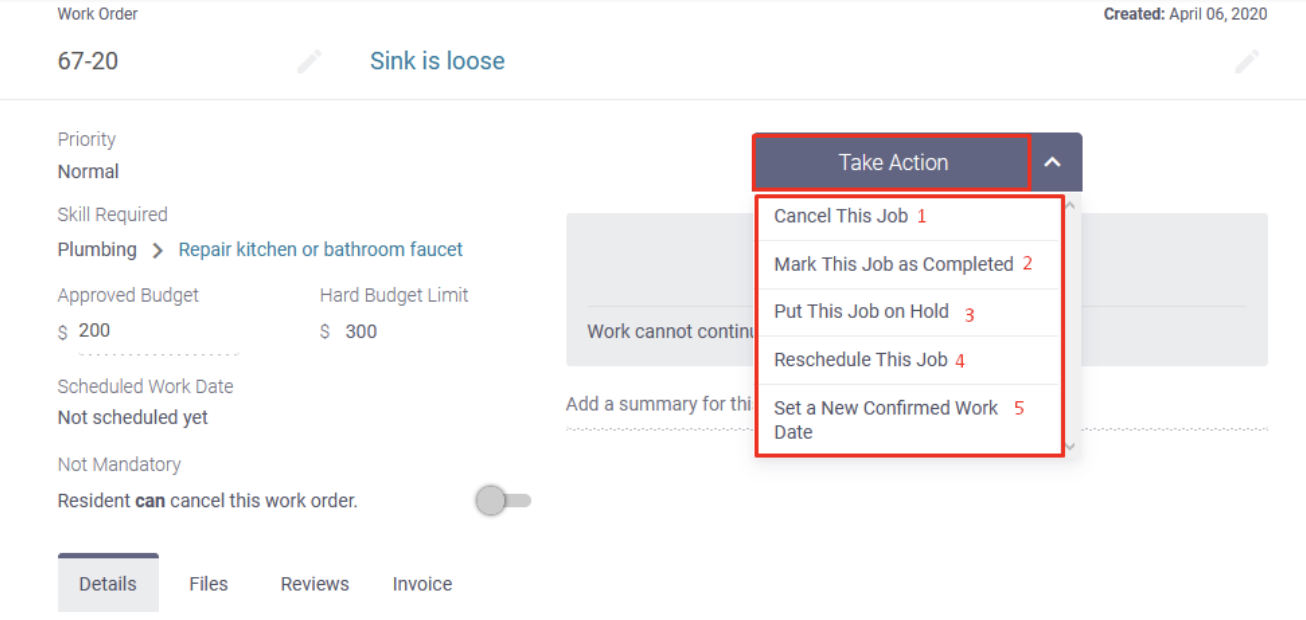
- Cancel this Job: All work will cease for this request and the job will move to the canceled column
- Mark this job as Completed: We will follow up with the Service Provider for their invoice through our platform as long as that feature is enabled.
- For more information on this feature, visit this guide here: https://latchel.ticksites.com/wp2/blog/how-to-disable-automatic-invoice-collection-from-preferred-service-providers/
- Put This Job on Hold: You can place the job into another more relevant status for what is required next.
- For more information on this status, visit this guide here: https://latchel.ticksites.com/wp2/how-to-place-a-work-order-on-hold/
- Reschedule This Job: The job will be placed right back into the relevant scheduling flow and Latchel will continue coordinating the work order until resolution.
- Set a New Confirmed Work Date: A specific work date will be set and a confirmation notice will be sent to the resident immediately.